Job boards
 Zoom image
A job's status told you whether you were still hiring, not whether anyone could see the ad. When it went live, when it came down, and which career sites and job boards carried it, you had to look up in different places.
Now every job has a publish status, Unpublished, Scheduled or Published, and a Publish data row under its properties holds the rest: the dates, the career sites and the job boards. Three job boards are free and need no account or setup.
Schedule a job for Monday and set Unpublish at to the last day for applications, and Attia publishes it on Monday and takes it down when the deadline has passed. To start, open a job and choose its status in Publish data.
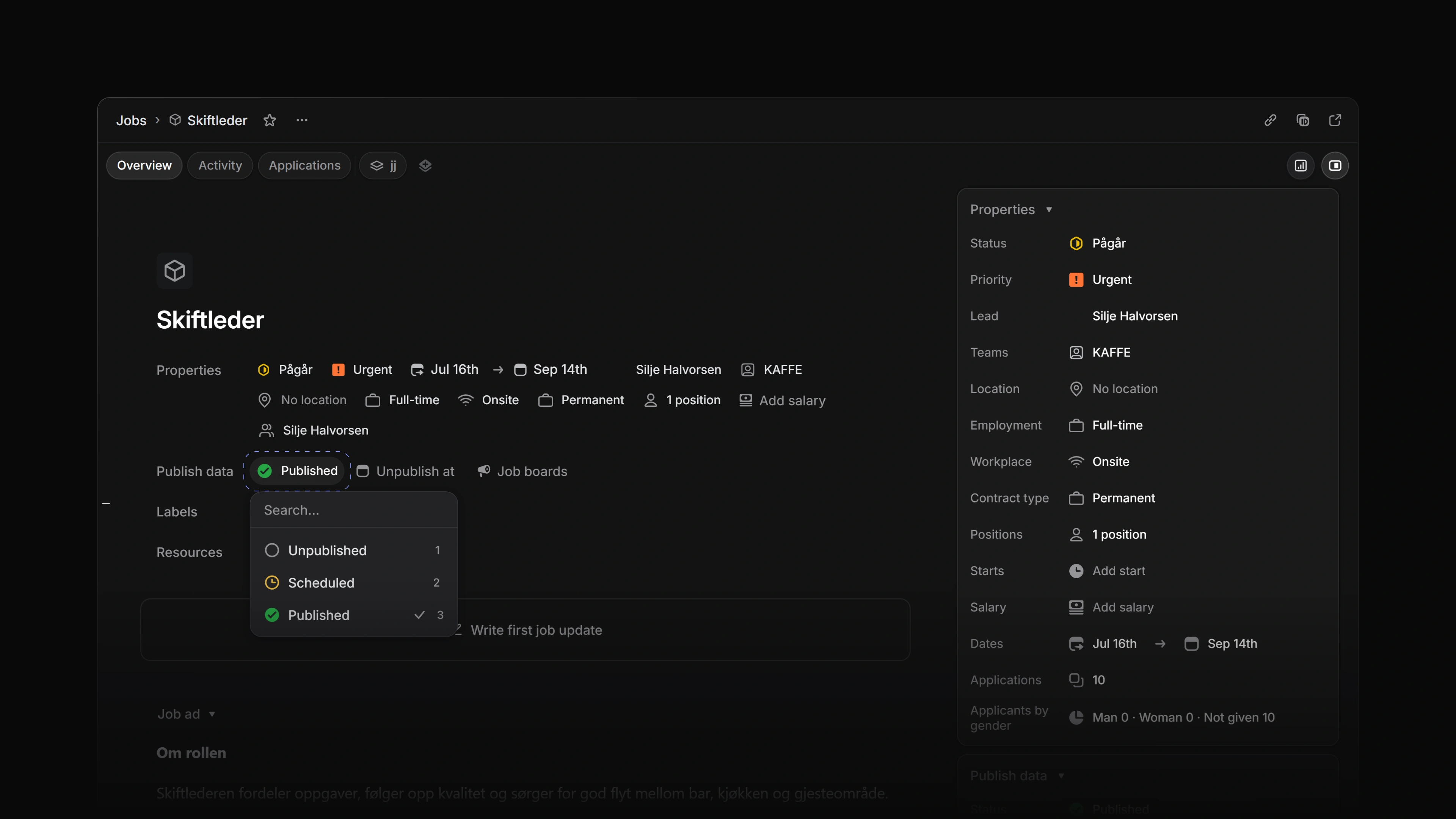
Publish status
Unpublished has a grey circle, Scheduled an amber clock and Published a green check. The icons show on the cards on the Jobs board, in group headers and filters, and on the job page. On the board, click the icon on a card, or point at the card and press Shift P, to change the status without opening the job.
 Zoom image
Scheduled jobs and deadlines
Choose Scheduled and a date picker opens for Publish at. Attia saves the status and the date together, and Escape leaves the job as it was. At Publish at, the job becomes Published. When Unpublish at, the application deadline, has passed, Attia unpublishes the job. Both happen within five minutes of the time. A job past its deadline can't be published or scheduled until you move Unpublish at to a later day.
Publish data
Publish data sits under the job's properties and as the first card in the side panel. It holds Status, Publish at while the job is scheduled, Unpublish at, Career sites and Job boards, and the side panel adds Visibility. The job's Activity now shows every publish and unpublish, not only the first.
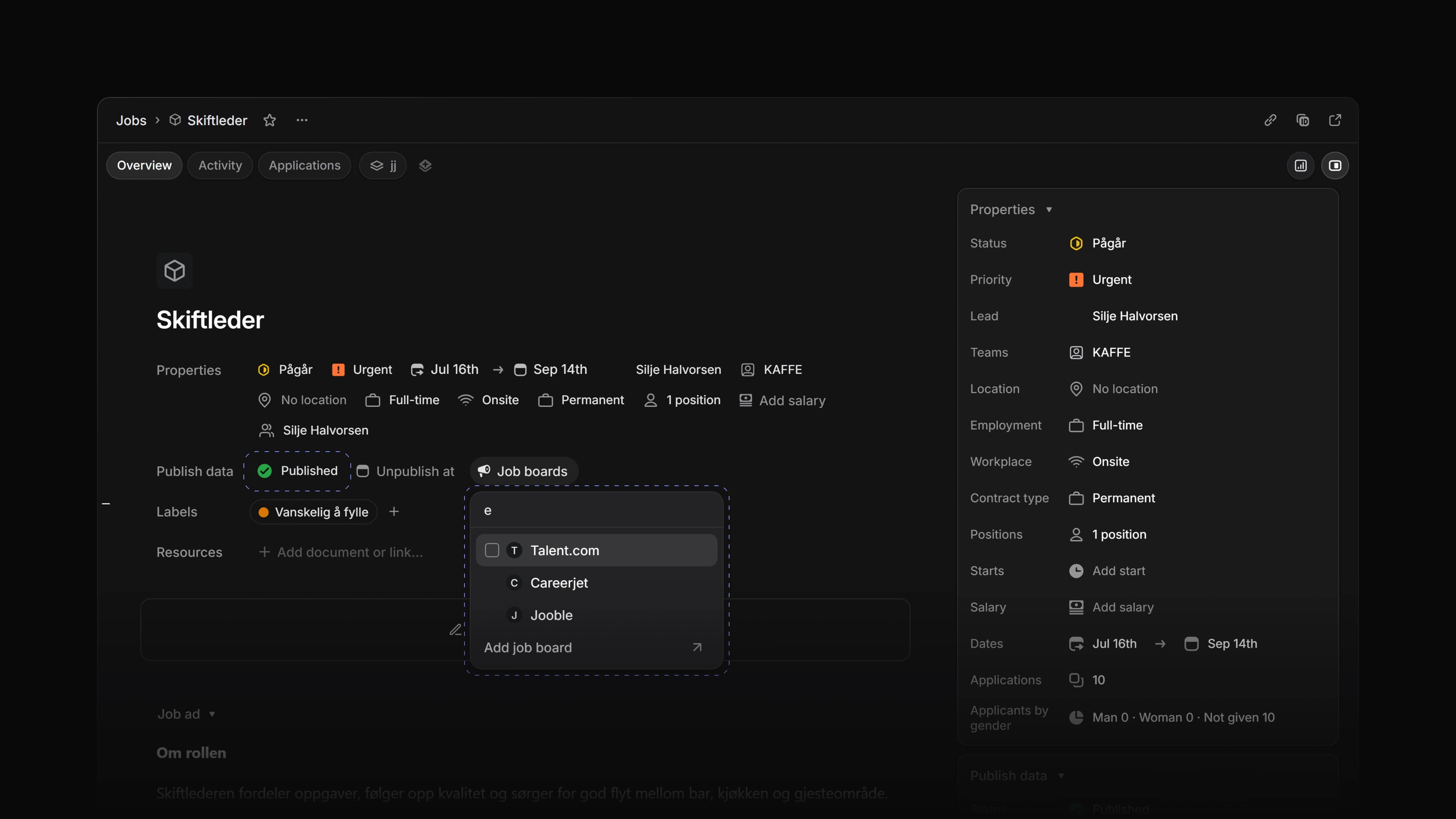
Job boards
Each board you pick sits in the Job boards row with its logo. The row's menu changes or adds boards, and Remove all job boards clears them. When you publish or schedule a job with boards picked, Publish to job boards names each board, marks the free ones and says that publishing to a board can't be undone. When the job has no Unpublish at, it offers Set date. Add job board at the bottom of the menu opens Settings > Integrations, which now has a section with each board's logo.
Free job boards
Talent.com, Careerjet and Jooble are in the Job boards menu with no account and no setup. Pick one, and while the job is published Attia offers it to that board and the row reads Offered.
Salary range
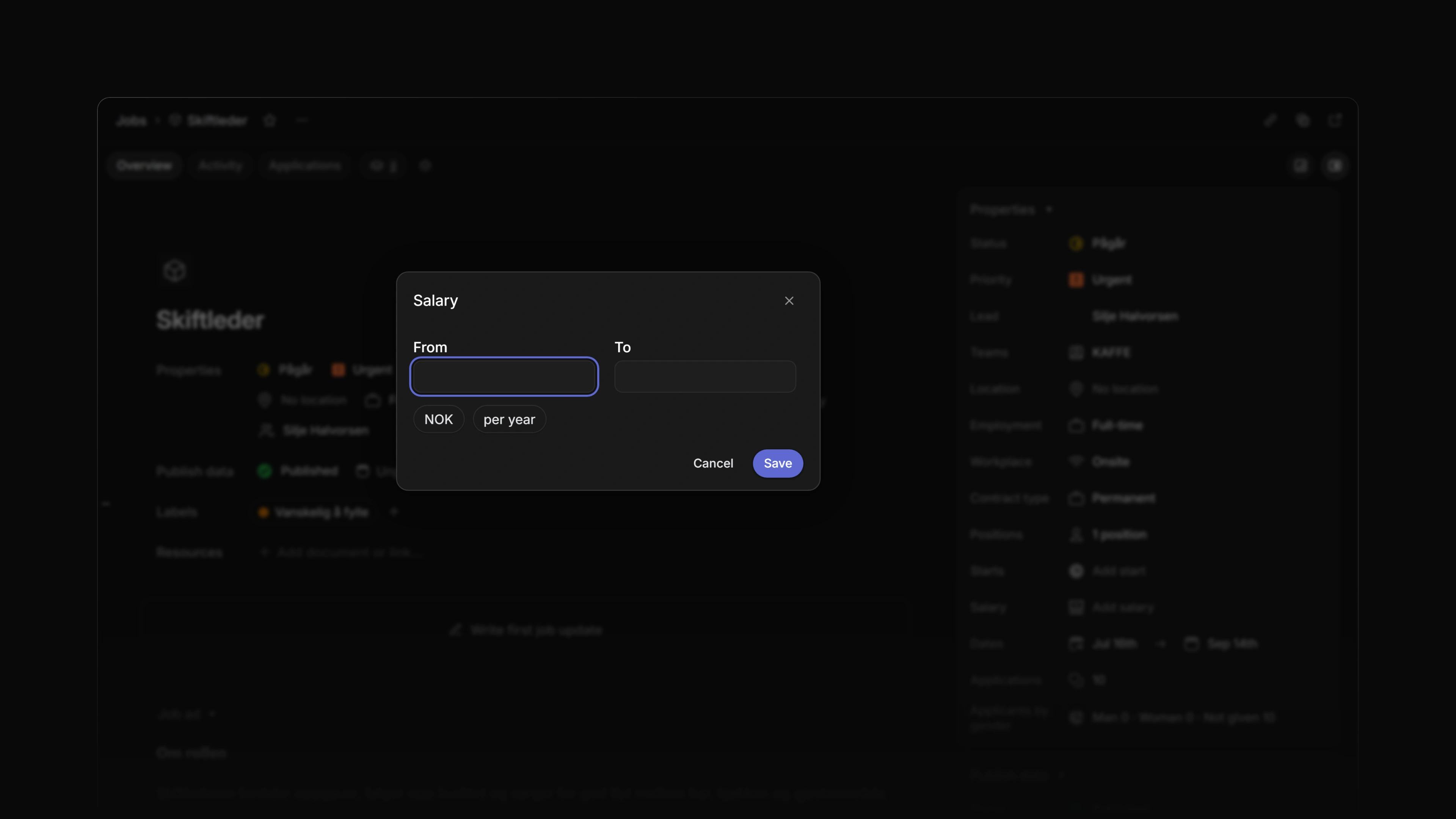
Add salary in the job's properties opens a dialog with From, To, the currency and per year, month or hour. The range shows on the job's page on your career site, such as 50 000–60 000 NOK per month. A job template can hold a default range, under the ... menu in the template editor. A change to the salary or the start date writes a line in the job's Activity.
 Zoom image
Jobs in Google's job search
Your career site's job pages now give Google the salary, the application deadline, the country, a job id and your logo, so Google's job search shows more of each job.
- Agent Added the publish status to what Attia Agent reads and sets on a job. It also reads the publish date, the deadline, the salary, the career sites and the job boards.
- Agent Added the dates, visibility, salary, start date, teams, hiring team, lead and icon of a job to what Attia Agent can set. It puts a job on a career site you name.
- Applications Added moving an application to another job, also one in another team, with the Job picker, and to another team on the same job with the Team picker. The candidate is told when their application moves to another job.
- Applications Changed an application that comes from Indeed or Google to name that board as its source.
- Career sites Added grouping to the Open roles section of a career site, by city, working hours, contract type or workplace.
- Documents Changed Add document to open in the file preview window, with the template picker in its header.
- Jobs Added Publish to Group by and Add filter on the Jobs list, with the same icons as on the job page.
- Jobs Added Edit and Archive when you right-click a question in Add question.
- Jobs Changed a job's main team so you can change it after the job has applications. The job's Applications page shows the applications from every team on the job.
- Loops Added Publish state as a trigger for a job Loop, and Publish and Job boards to the Change properties step.
- Keyboard shortcuts Added
ShiftPto open the publish status menu on the board card under the pointer.
- Added the publish status to each job the API returns: unpublished, scheduled or published.
- Career sites Fixed the preview of an unpublished career site showing a link that went nowhere.
- Career sites Fixed the privacy dialog on a career site with a dark theme painting in light colours.
- Career sites Fixed the Edit label on a job's career site row not being translated.
- Jobs Fixed choosing Scheduled for the date a job already had leaving the job unscheduled.
- Jobs Fixed choosing Published on a Scheduled job not sticking.
- Jobs Fixed publishing a Published job again moving its publish date.
- Jobs Fixed auto-archive archiving a job that was never published. It now counts from the day the job closed.
- Jobs Fixed an archived job's Overview offering edits.
- Jobs Fixed a job's Insights panel hiding its controls when the job had no applications, and Insights not opening on a team with no rating scale.
- Jobs Fixed missing icons in the job page's menu and missing avatars in its Members dropdown.
- Jobs Fixed the members count reading the wrong word for one member.